Eturns Team · February 8, 2026 · Updated April 18, 2026 · 5 min read
AI Escalation: When Should Your Chatbot Hand Off to a Human?
TL;DR
AI chatbots should escalate to humans when they detect customer frustration, encounter complex disputes, handle high-value orders, fail to resolve after 2 attempts, or receive an explicit request for a human agent. The ideal escalation rate is 10-20%.
AI Escalation Is the Handoff from Bot to Human — and It Determines Whether Customers Trust Your Support
AI escalation is the process of transferring a customer conversation from an AI agent to a human support representative when the AI determines it cannot or should not resolve the issue alone. Done well, escalation is invisible to the customer — the human agent picks up with full context and resolves the issue without the customer repeating a single detail. Done poorly, it is the single fastest way to destroy customer trust in your support operation.
The escalation rate — the percentage of AI conversations that get handed off to humans — is one of the most important metrics in AI customer support. Industry benchmarks suggest that a healthy escalation rate falls between 10% and 20% for after-sale requests. Below 10% may mean your AI is attempting to handle situations it should not. Above 25% suggests your AI needs better policy documentation or integration work.
The Five Triggers for AI Escalation
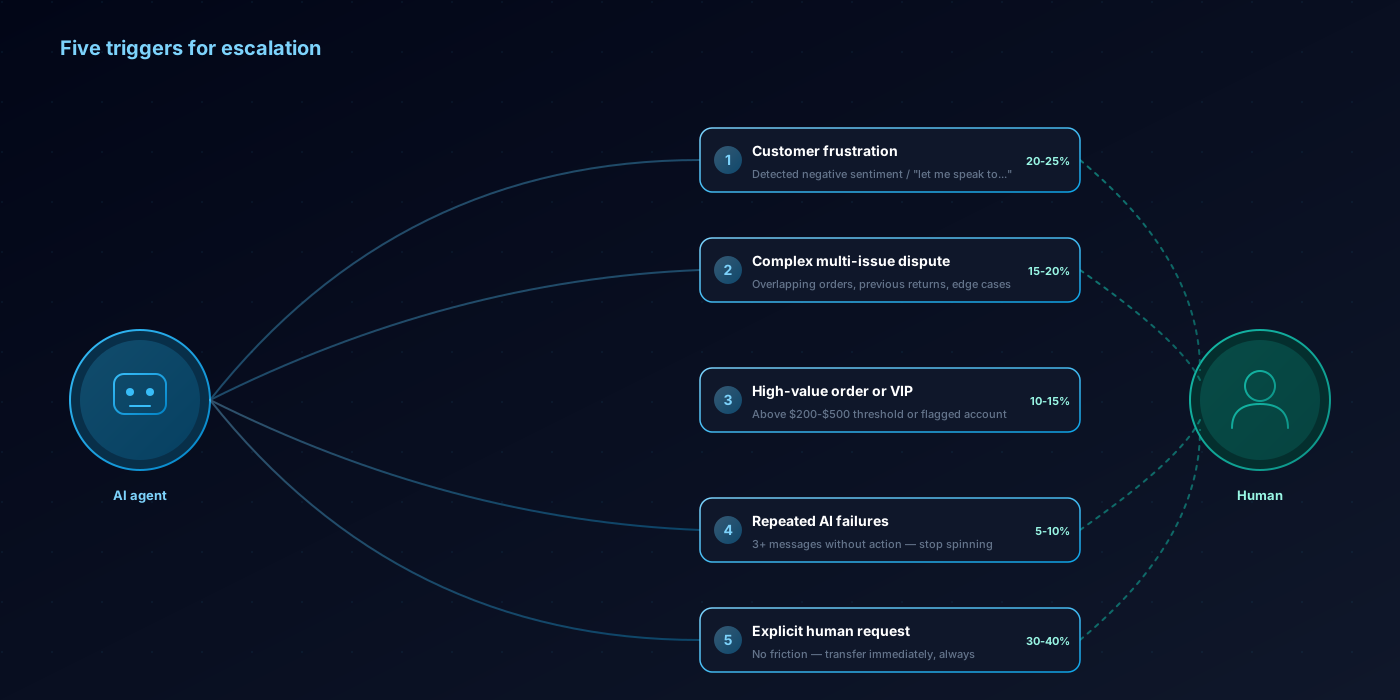
Not every difficult conversation requires escalation. These five triggers represent the situations where AI should always hand off to a human.
1. Customer Frustration or Emotional Distress
When a customer expresses anger, frustration, or distress — "this is ridiculous," "I've been dealing with this for weeks," "I need to speak to a real person" — the AI should escalate immediately. Understanding when to use AI vs human support is critical here. Modern AI can detect negative sentiment through language patterns, punctuation intensity, repeated messages, and explicit statements of frustration.
This is not about the AI being incapable of responding to an upset customer. It is about what the customer needs. A person who is frustrated wants to feel heard by another person. An AI response, no matter how empathetic in tone, can feel dismissive to a customer who has already reached their breaking point. Research from the Harvard Business Review found that 72% of customers who escalate to a human agent rate the experience positively when the handoff is fast and context-preserving — but only 28% rate it positively when they have to repeat their issue.
2. Complex Multi-Issue Disputes
When a conversation involves multiple overlapping issues — a partial shipment, a damaged item in the same order, a previous return that was not refunded, and a price match request — the AI should escalate. While AI can handle individual issues effectively, the combination of multiple unresolved problems across different orders requires the kind of holistic judgment that human agents provide.
These cases represent roughly 5-8% of after-sale requests but account for a disproportionate share of customer frustration and chargeback risk. Getting them right is worth the human agent cost.
3. High-Value Orders or Customers
Many stores set a dollar threshold above which AI-initiated actions require human review. Common thresholds range from $200 to $500 for individual order value. Similarly, customers identified as VIPs — by lifetime value, loyalty program tier, or account flags — may be routed to human agents for any after-sale request.
The logic is straightforward: the cost of getting a $500 return wrong (chargeback, lost customer, negative review) far exceeds the $20 cost of a human interaction. For a customer with a $10,000 lifetime value, every interaction is an investment in retention.
4. Repeated AI Failures
If the AI fails to understand or resolve a request after two or three attempts — the customer keeps rephrasing, the AI gives the same unsatisfactory response, or the conversation is going in circles — it should escalate rather than continue frustrating the customer.
This trigger is about self-awareness. A good AI agent recognizes when it is stuck. Indicators include: the customer sending the same message twice, three or more consecutive messages without the AI taking a concrete action (like looking up an order or checking a policy), or the customer using phrases like "you're not understanding me" or "that's not what I asked."
5. Explicit Customer Request
When a customer says "I want to talk to a human," "transfer me to an agent," or "let me speak to a manager," the AI should comply immediately. No persuasion, no "let me try to help you first," no friction. Respecting this request is both a customer experience principle and a legal requirement in some jurisdictions.
Studies from Forrester show that 58% of customers who explicitly request a human agent are already dissatisfied with the AI interaction. Adding friction to the handoff compounds the dissatisfaction. The fastest path to recovery is an immediate, context-rich transfer.
How Context Transfer Works
The quality of escalation depends entirely on how much context the human agent receives. A good AI escalation includes:
- Full conversation transcript: Every message exchanged between the customer and the AI, in order.
- Order data: The specific order(s) discussed, including line items, prices, dates, fulfillment status, and any previous returns.
- Actions taken: What the AI already did — looked up the order, checked eligibility, offered options — so the human does not repeat steps.
- Escalation reason: Why the AI escalated — customer frustration detected, policy ambiguity, high-value threshold, explicit request.
- Customer summary: A brief AI-generated summary: "Customer is requesting a return for order #4392 (blue dress, $89, purchased 28 days ago). Item is within return window. Customer expressed frustration about quality and wants a refund, not an exchange."
When human agents receive this context, they resolve the issue 40% faster than starting from scratch (Intercom Customer Service Report, 2025). The customer feels heard because they are not repeating themselves. The agent feels prepared because they have all the information upfront.
Setting Up Escalation Rules
Effective escalation rules are specific and testable. Vague rules like "escalate when the situation is complex" lead to inconsistent behavior. Here is a practical framework:
Sentiment-based: Escalate when the customer sends two or more messages with negative sentiment indicators (profanity, exclamation-heavy phrasing, explicit dissatisfaction statements) within a three-message window.
Confidence-based: Escalate when the AI's confidence in its response drops below a defined threshold. If the AI cannot classify the intent with high confidence or the request does not match any documented policy, it should hand off rather than guess.
Value-based: Escalate when the order total exceeds your defined threshold or when the customer is flagged as a VIP in your system.
Attempt-based: Escalate after three exchanges where the AI has not moved the conversation toward resolution — no order looked up, no policy checked, no option offered.
Explicit: Escalate immediately on any request for a human agent, with zero resistance.
Measuring Your Escalation Rate
Track your escalation rate weekly and break it down by trigger type. A healthy breakdown for a well-tuned AI system looks approximately like this:
- Explicit customer request: 30-40% of escalations
- Sentiment/frustration detection: 20-25% of escalations
- Complex/multi-issue: 15-20% of escalations
- High-value threshold: 10-15% of escalations
- Repeated failure: 5-10% of escalations
If your "repeated failure" category exceeds 15%, your AI needs better policy documentation or integration work. If "explicit request" is above 50%, your AI may not be providing satisfactory first responses — customers are asking for humans because they do not trust the AI to help, not because their issue is genuinely complex.
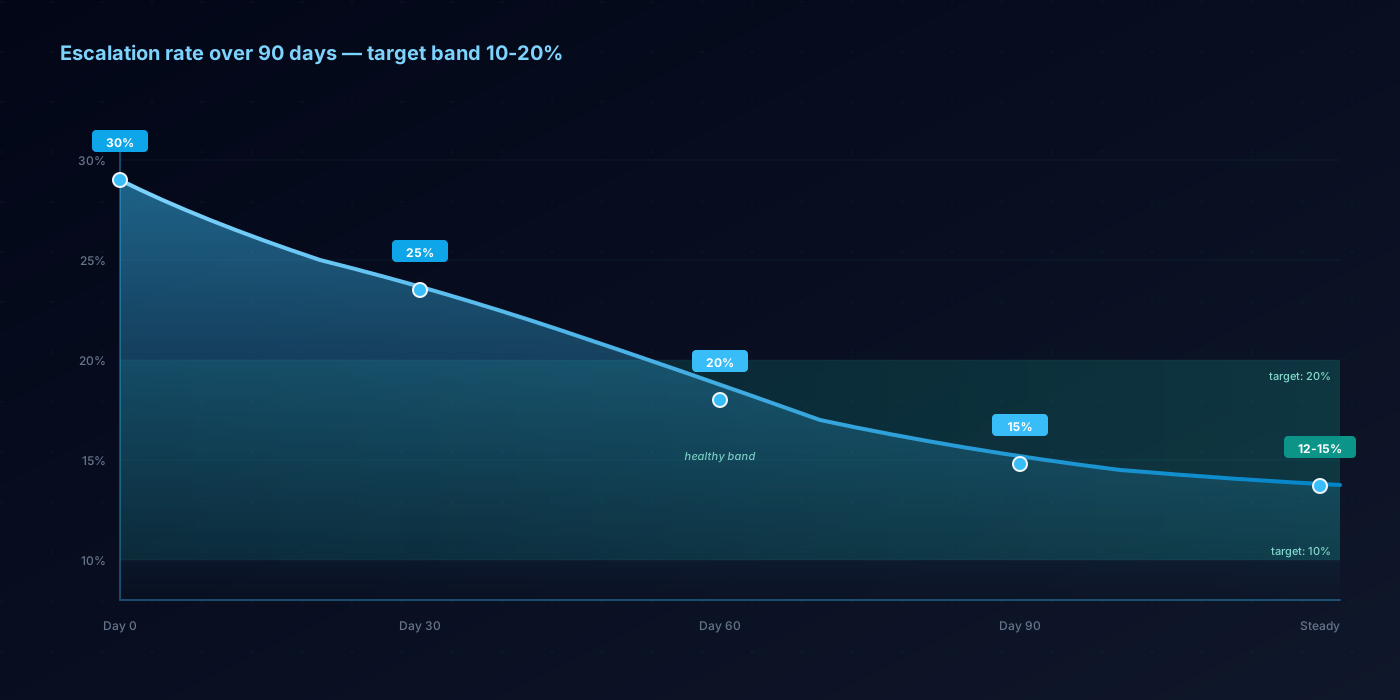
The overall escalation rate should decrease over time as you improve your AI's capabilities. A new deployment might start at 25-30% and settle to 12-18% after 60-90 days of optimization. If it is not decreasing, review the conversations that triggered escalation and identify patterns — you will almost always find a handful of policy gaps or integration limitations driving the majority of handoffs.
The Cost of Bad Escalation
Poor escalation does not just frustrate customers — it costs you money. When a customer has to repeat their entire story to a human agent, the human interaction takes 30-50% longer (Gartner Customer Service Study). That longer handling time increases your cost per escalated interaction from $20 to $28-$30. Multiply that by 100 escalations per month, and poor handoff design costs you an extra $800-$1,000 monthly in wasted agent time alone.
Worse, customers who have a negative escalation experience are 3x more likely to leave a negative review and 2.5x more likely to initiate a chargeback instead of working through the return process (Qualtrics XM Institute, 2025). Good escalation is not just a support design detail — it is a revenue protection mechanism.
Frequently Asked Questions
What is a good escalation rate for AI support?
For after-sale requests in e-commerce, aim for 10-20%. Below 10% may indicate your AI is attempting to handle situations it should escalate. Above 25% suggests gaps in policy documentation or integration depth. New deployments typically start higher (25-30%) and decrease to 12-18% within 60-90 days of optimization.
Should the AI tell the customer it is escalating?
Yes, always. Transparency builds trust. The AI should say something like "I'm going to connect you with a team member who can help with this" and provide a realistic time expectation. Never silently transfer or make the customer think they are still talking to AI when a human has taken over (or vice versa).
Can I customize which situations trigger escalation?
Absolutely. Most AI support platforms allow you to configure escalation triggers based on your specific needs — order value thresholds, customer segments, product categories, specific keywords, or sentiment scores. Start with aggressive escalation rules and tighten them as you build confidence in your AI's capabilities.
Frequently Asked Questions
What is a good escalation rate for AI support?
Should the AI tell the customer it is escalating?
Can I customize which situations trigger escalation?
Automate your Shopify returns with AI
Eturns is the AI-powered Shopify returns app that handles returns, exchanges, and refunds automatically. Reduce refund rates by 40-70% and resolve requests in minutes.
Related Articles
AI Customer Support for E-commerce: The Complete 2026 Guide
AI customer support is no longer about simple chatbots. In 2026, intelligent agents resolve after-sale requests autonomously. Here's everything you need to know.
AI SupportAI vs Human Support: When to Use Each for After-Sale Requests
AI handles 80% of routine requests at 1/15th the cost. Humans handle the 20% that need empathy and judgment. Here's how to get the balance right.
AI SupportHow AI Chatbots Handle E-commerce Returns (Step by Step)
A step-by-step walkthrough of how AI processes a return request — from customer message to resolution in under 2 minutes.